Join the beta
Leave your email and we send you a personal download link. Nothing else.
What happens next
Fair warning: it's experimental and very much a work in progress. You'll hit rough edges. We keep working on it, and updates land in the app on their own.
It's on its way.
We sent a link to . Open it on the Mac you'll install on.
Nothing after a minute? Look in spam, or send it again.
Welcome in.
Bookmark this page. Your link always serves the latest build.
- 01
Drag it to Applications
Unzip, then drag Beatknife to Applications. Not Downloads: it can't update itself from there.
- 02
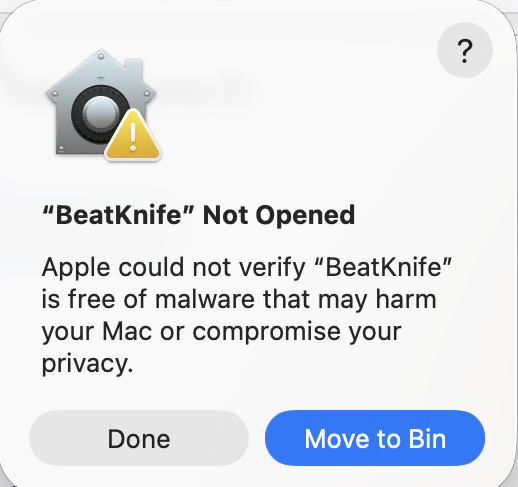
Open it once, click Done
The beta isn't signed with an Apple certificate yet, so macOS stops it the first time. Click Done, not Move to Bin.
- 03
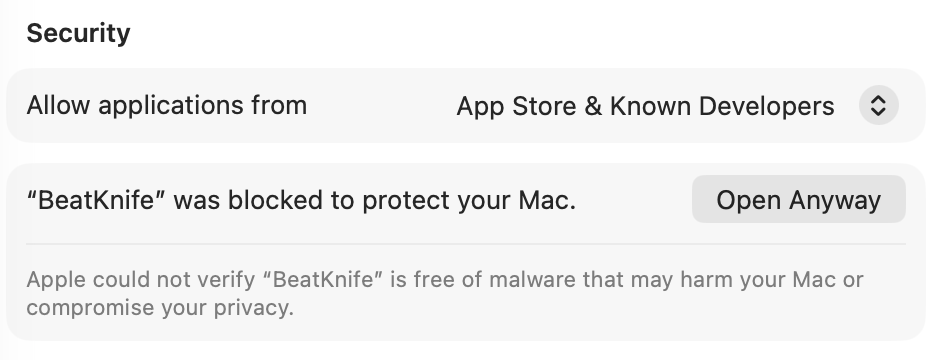
Open Anyway
Press the button, scroll to Security, click Open Anyway and confirm. The row only shows after step 2, and only for a while. Once per install; updates never ask again.